

A broker email lands on Friday morning with three attachments: a loss run exported from another carrier’s system, a financial statement scanned sideways, and a spreadsheet with its own column logic. Before anyone can judge the risk, someone has to retype all of it.
An underwriting workbench is the software that takes that job off the underwriter’s desk. It brings the submission, policy data and risk models into one screen, extracts the information from emails and documents, and leaves the underwriter to decide on the risk.
What Is an Underwriting Workbench, and Why Does It Matter Now?
In a traditional carrier workflow, underwriters move between the core system, offline spreadsheets and broker emails, re-entering the same data in each. The cost is measurable. McKinsey estimates that in large commercial lines, 30 to 40 percent of an underwriter’s time goes to administrative work such as rekeying data (McKinsey, Insurance productivity 2030). Capgemini’s 2024 research puts the figure at 41 to 43 percent across commercial and personal lines, against roughly a third spent on core work such as risk assessment and pricing (Capgemini Research Institute).
A workbench replaces that with one place where the submission, loss history and third-party data (business registries, credit bureaus, hazard maps) are already combined. It matters now because loss ratios are volatile, commercial risks keep getting more complex, and brokers expect an answer in hours, not days.
Most carriers still have ground to cover. In a LexisNexis study of commercial auto carriers, the average time to produce a quote was three days, and carriers applied straight-through processing to 40 percent or less of their applications (LexisNexis Risk Solutions).
What Are the Main Benefits of an Underwriting Workbench?
- Less manual transcription: ingestion tools extract data from broker emails, financial statements and unstructured documents into structured records, so nobody retypes them.
- Faster quotes: standard submissions go through automated triage instead of waiting in a queue, and underwriters see the files that need them first.
- Tighter underwriting governance: visibility into loss runs, aggregate accumulations and rating rules helps keep guidelines consistent across distribution channels.
- Lower expense ratio: automating administrative processing cuts operating costs, and real-time exposure checks help keep pricing accurate.
How Does an Underwriting Workbench Work? Step by Step
Step 1: Automated ingestion and document parsing
The workflow starts when a submission reaches the carrier. Instead of manual data entry, the platform uses natural language processing (NLP) and computer vision to pull structured data out of broker emails, loss runs and financial PDFs.
Step 2: Risk enrichment and automated clearance
Once the data is parsed, the platform cross-references the applicant against internal databases and external sources such as business registries, credit bureaus and hazard maps. Sanctions screening, compliance checks and duplicate-submission checks run automatically.
Step 3: Rule-based triage and pricing
Standard, low-complexity risks are rated by rules and priced automatically. If the risk sits within the carrier’s appetite, the quote can go out straight through, with nobody touching the file. Anything outside those limits goes to Step 4.
Step 4: Assisted underwriting for complex exposures
When a submission falls outside the automated limits, the workbench routes it to an underwriter with a risk score, projected loss ratio and suggested terms attached. That leaves underwriters free to concentrate on the exposures that need analysis.
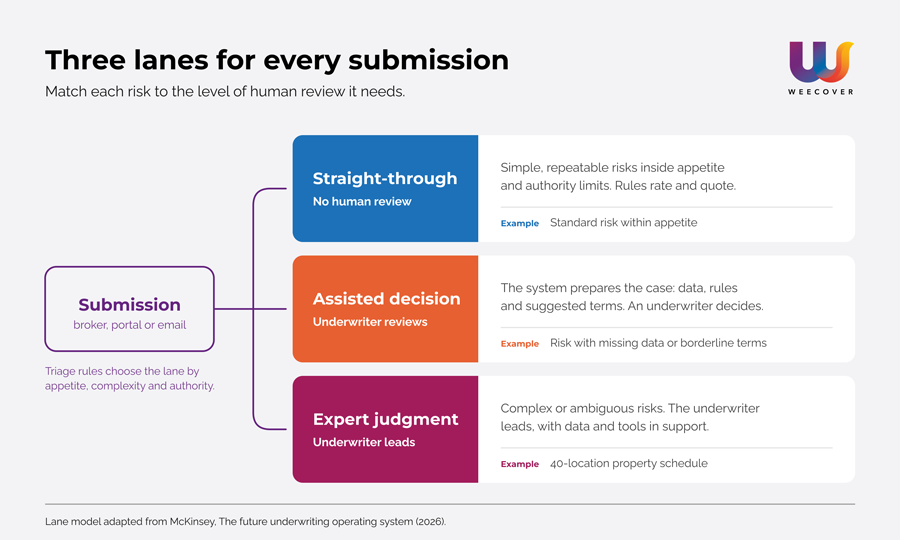
Not every submission should take the same path. McKinsey describes three lanes: a straight-through lane for simple, repeatable risks inside the carrier’s appetite and authority limits; an assisted-decision lane, where the system prepares the case and an underwriter reviews it; and an expert-judgment lane for complex or ambiguous risks, which stay underwriter-led (McKinsey, The future underwriting operating system). It is a useful way to decide, before you buy anything, which of your risks belong in which lane.
The Architecture Behind a Workbench
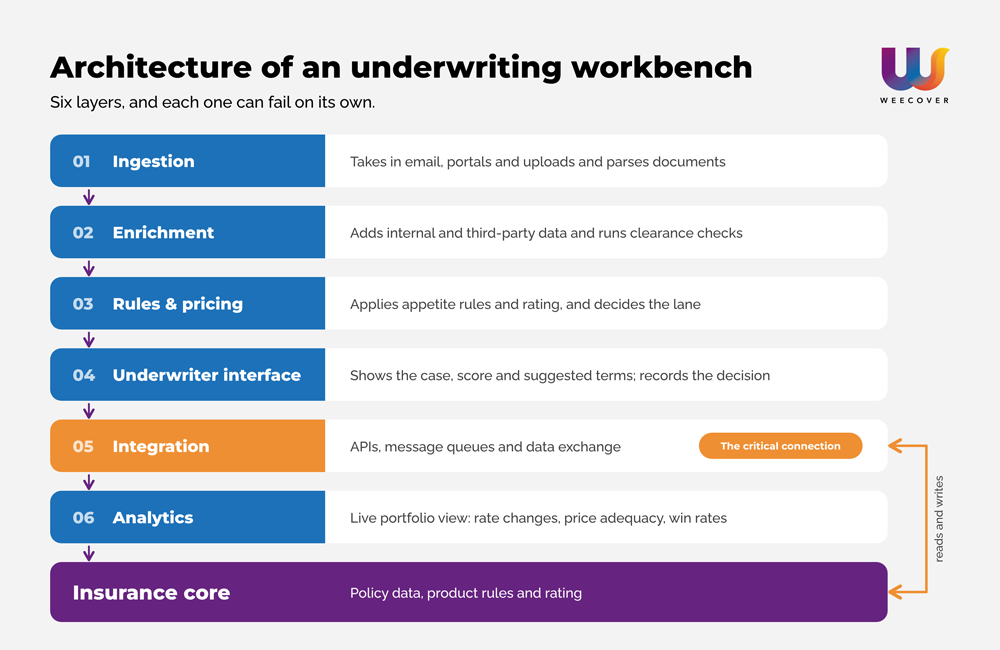
A workbench is a set of layers, and each one can fail on its own:
- Ingestion layer: receives submissions from email, portals and uploads, and parses documents into a standard schema.
- Enrichment layer: adds third-party and internal data, and runs clearance and sanctions checks.
- Rules and pricing layer: applies appetite rules and rating, and decides which lane a case takes.
- Underwriter interface: shows the case, the score and the suggested terms, and records the decision.
- Integration layer: connects through APIs and message queues to the core, to data providers and to broker channels.
- Analytics layer: feeds a live view of the portfolio, such as rate changes, price adequacy and win rates.
The fifth layer is where most projects get stuck. The workbench is only as current as the data it can read from, and write back to, the core underneath it.
Workbench vs PAS vs modern core
| Underwriting workbench | Traditional PAS | Modern cloud core | |
|---|---|---|---|
| Main job | Intake, enrichment, triage and pricing support before binding | System of record for issued policies, billing and endorsements | Product configuration, rating, quoting, issuance and policy administration on one platform |
| Main user | Underwriters | Operations and finance teams | Underwriting, operations, distribution and IT |
| Weak spot | Depends on the quality of the core’s data and rules | Often needs other tools for quoting and pricing | Needs clear rules about which risks go straight through |
The line between these categories is blurrier than it used to be, which is why many carriers now ask whether they need a separate workbench at all.
What to Get Right Before You Roll One Out
Treat the workbench as something that speeds underwriters up, not something that replaces their judgment. The best results come from removing administrative bottlenecks and leaving complex risks to people.
- Use AI where retyping is the bottleneck. Document extraction and machine learning pay off where people copy data by hand. Adding them elsewhere just to say you have them rarely does.
- Start with one lighthouse case. McKinsey’s advice is to pick a high-volume line or renewal book, build the minimum data foundations it needs, define controls such as confidence thresholds and override rules, and launch one or two workflows before widening the scope.
- Give underwriters live portfolio data. Rate changes, price adequacy and win rates should be visible before they commit capacity, not in a quarterly report.
- Plan the integration with your core from day one. Build two-way connections between the workbench and your core platform. [Internal link: Weecover cloud insurance core page]
Where Workbench Projects Go Wrong
The most common failure is a modern interface over the same old plumbing. A new screen on top of disconnected legacy databases still leaves people retyping data between systems, and the project gets blamed for a problem it never touched.
The second is forcing bespoke risks through automation. A 40-location property schedule with mixed construction types does not belong in a straight-through rule set, and trying to push it there leads to mispricing. McKinsey’s own outlook has long expected underwriting for large commercial and tailored specialty lines to stay far from fully automated. Keep straight-through processing for standard risks.
The third is leaving underwriters out of the design. When risk specialists have no say in how the workflow works, they keep their own spreadsheets, and the workbench becomes an extra step instead of a replacement for one.
AI in Underwriting Needs Governance
If your workbench uses machine learning to score or price risk, governance is part of the project. In August 2025, EIOPA published an Opinion on AI governance and risk management. It explains how existing insurance rules, including Solvency II, the Insurance Distribution Directive and DORA, apply to AI systems, and it expects a proportionate, risk-based approach (EIOPA).
The EU AI Act adds a second layer for some lines. AI used for risk assessment and pricing of individuals in life and health insurance is classified as high-risk, and under the Digital Omnibus the date those obligations apply was moved to December 2027. Property, casualty and general commercial lines are not on that list. Check the current text before you rely on any date.
In practice, this means logging decisions, keeping a human override on borderline cases and being able to explain why a price came out the way it did.
Where Underwriting Logic Should Live
Workbenches are getting good at what they were built for: gathering a submission in one place so underwriters spend less time retyping and more time judging risk. But the interface is the easy part. Whether it works depends on what sits underneath: where product rules live, how quickly a price recalculates, and whether policy data is current when someone opens the file.
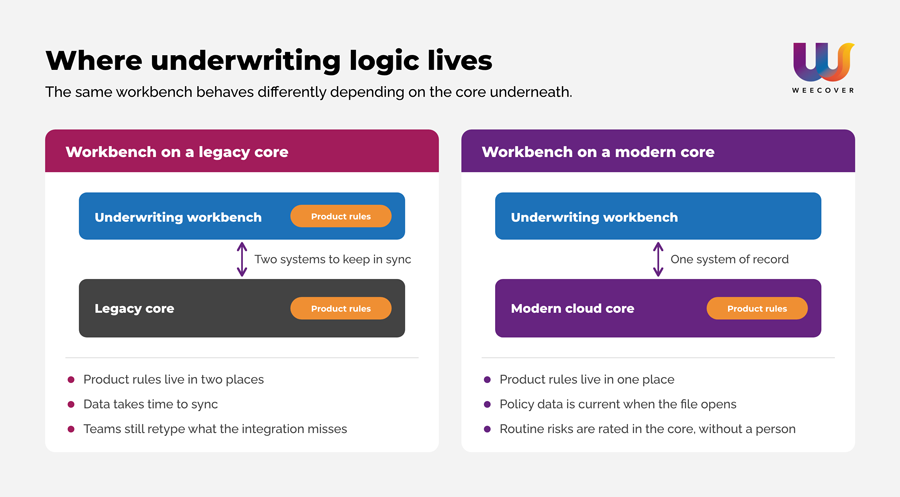
That is why we think the useful question is not “which workbench should we buy?” but “where should underwriting logic live?” For high-complexity commercial risks, a dedicated workbench still makes sense, because underwriters need room to apply judgment. Routine, low-complexity risks should be rated by rules in the core, in one place, so they never need to reach a person. That leaves underwriters with the files that need judgment, and more time to spend with brokers on them.
That is the setup we build for at Weecover, a cloud, multi-line insurance core where product configuration, rating, quoting and issuance run on the same platform. If you are weighing a workbench and suspect your current core is the real bottleneck, start there. Our [Core Modernization Checklist: add link] covers the questions to ask before you commit to either.

Frequently Asked Questions About Underwriting Workbenches (FAQs)
A traditional Policy Administration System is the system of record: it stores issued policies and handles billing and endorsements. A workbench sits earlier in the process, supporting risk assessment, broker negotiation, data enrichment and pricing before a policy is bound. The line is blurrier than it used to be. Modern cloud cores also cover quoting, rating and issuance, which is why many carriers now ask whether they need a separate workbench at all.
Yes, and plenty of carriers start there. A workbench can sit on top of an older core through APIs and message queues. The catch is that product rules now live in two places, data takes time to sync, and your team still retypes whatever the integration doesn’t cover. It works as a bridge. If you are adding a workbench mainly to hide the limits of your core, it is worth asking whether the core is the real project.
You would not be alone. In Novidea’s 2025–26 survey of 200 insurance leaders, 95 percent reported significant challenges with their legacy core platforms, and 73 percent planned to upgrade within three years (Novidea survey, via FinTech Global). West Monroe’s survey of 300 insurance executives found that almost every carrier has modernization plans, but few are making real progress (West Monroe, via Insurance Thought Leadership). Both surveys come from software and consulting firms, so read them as context rather than proof.
No. A workbench takes over the clerical work: retyping, chasing documents, checking for duplicates. Underwriters get that time back for the exposures that need judgment, and the decisions on complex risks stay with them.